
 Screen Reader



Academic Bank of Credits (ABC)
This learner information page is developed in accordance with NCVET Office Order No. 1101/26/2020, dated 05 April 2024, which mandates:
- Student registration on ABC/APAAR
- APAAR ID on admission, registration, and assessment forms
- Upload of certificates linked with APAAR ID
- Learner awareness on ABC
What is the Academic Bank of Credits (ABC)?
The Academic Bank of Credits (ABC) is a national-level digital platform under the National Education Policy (NEP) 2020 that allows learners to securely store, view, and manage all their academic and skill-based credits in one place.
Your ABC account helps you:
- Access your academic and skill credits anytime
- Keep all certificates stored digitally
- Share your verified records easily
- Track your learning progress across institutions
All learners enrolled in SCPwD-affiliated programs must register for an ABC/APAAR ID.
FAQs
1. 🎓 What is APAAR ID?
APAAR (Automated Permanent Academic Account Registry) is a unique, lifelong academic ID for every learner.
Your APAAR ID will:
- Link all your certificates and credits
- Be required for admission, registration, and assessments
- Be printed on your student ID and forms
2. 🚀 How to Register for ABC / APAAR ID
Follow these simple steps:
-
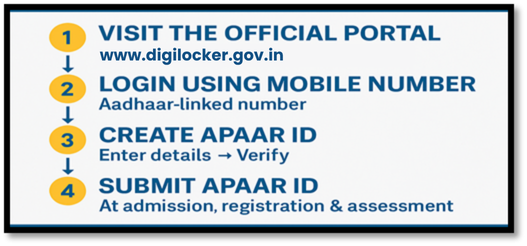
Step 1: Visit the Official Portal
Click one of the options below:
ABC Portal: https://www.digilocker.gov.in
DigiLocker App: Google Play Store
Step 2: Login Using Your Mobile Number
Use your Aadhaar-linked mobile number for verification.
Step 3: Create Your APAAR ID
Enter basic details → Verify → APAAR ID is generated instantly.
Step 4: Share APAAR ID With Your Institute
Submit your APAAR ID during:
- Admission
- Registration
- Assessment form submission
This helps the institute upload your credits into ABC.

3. 📄 Why Learners Must Create APAAR/ABC ID
As mandated by NCVET guidelines:
- ✔ Mandatory for all students to register on ABC
- ✔ Required for certificate issuance and credit storage
- ✔ Ensures transparency of academic progress
- ✔ Helps combine credits from different learning modes:
- Training
- Skilling
- Apprenticeships
- Internships
- Project Work
- Academic/Vocational programs
4. 📝 After Registration – What You Should Do
1. Provide your APAAR ID to the Training Centre
This ensures your skill certificates and marksheets are uploaded correctly.
2. Verify uploaded credits
Log in to your ABC account to check if:
- Certificates are visible
- Total credits are correct
- All credentials are properly mapped
3. Keep your mobile number updated
ABC notifications and updates are shared through registered contact details.
5. 📂 Documents Generated for Learners
Once your institution uploads your credentials, you will receive:
- Digital Skill Certificate
- Marksheet/Gradesheet
- Credit summary linked with APAAR ID
These documents stay permanently in your ABC locker.
📢 Important Notices for Learners
- APAAR ID is mandatory for participation in assessments.
- Students must ensure that correct APAAR ID is submitted.
- ABC/APAAR details may be verified during certification and placement.
- Upload of certificates is subject to successful Aadhaar-based verification.
🧭 Contact the Nodal Officer
If you have any difficulty with ABC/APAAR registration or credit updates, you can contact the institutional Nodal Officer.
Institution ABC/APAAR Nodal Officer:
Name: Mr. Subrato Dass
Designation: Assistant Manager – Operations & Training
Mobile: 91-011-20892791
Email: subrato.dass@scpwd.in
.png)